5 Components That Make Up the Heart (and Brain) of Your Computer
They say it’s what’s on the inside that matters most. Many of us fire up our computers without a second thought as to how they work, but what’s “under the hood” really does make a difference in how our PCs and Macs operate.
Your computer might seem extraordinarily complex, but it doesn’t take a rocket scientist to understand the inner workings. An overview of the main components will provide you with some basic knowledge and might help you troubleshoot simple problems should they arise.
5 Basic Computer Components Control All Tasks
When learning about biology, you might recall the lyrics to a song that includes verses like, The foot bone’s connected to the leg bone, the leg bone’s connected to the knee bone, etc. It’s a catchy way of helping you remember basic anatomy.
In many ways, a computer is like the human body. Its parts function similarly to our own internal organs except it requires electricity instead of oxygen to run.
Computers perform five main tasks: inputting, storing, processing, outputting, and controlling. These basic operations are controlled by the following five components:
 |
1. Central Processing Unit (CPU). Sticking with the human body analogy, the CPU is essentially the brain of the computer. It processes instructions received from hardware (keyboard, mouse) and software (computer program) and sends commands to other components in the computer, allowing them to complete the requested task. The CPU is often referred to as a microprocessor or chip. Its speed is measured in hertz (Hz) or gigahertz (GHz); the CPU can perform billions of operations in a single second. | |
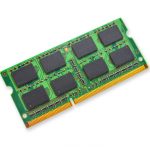 |
2. Random Access Memory (RAM). RAM is the computer’s short-term memory. It stores all data currently in use — everything from open browser tabs to the time and date display in the bottom corner — allowing information to be accessed quickly. These days RAM is measured in gigabytes; the more RAM a computer has, the better its ability to operate multiple programs simultaneously. RAM is volatile, meaning all stored data is deleted once the computer is powered off. | |
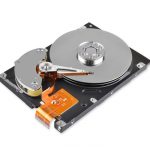 |
3. Hard Drive. The hard drive, short for hard disk drive, functions as the computer’s long-term memory, offering physical storage for all data and files. It stores and retrieves digital content. Unlike RAM, the hard drive is non-volatile, meaning all data is saved even when the computer is rebooted. Hard drive storage is measured in gigabytes or the larger terrabytes; those seeking additional storage or wishing to back up content often add an external hard drive. Storing files online in the cloud is another option. | |
 |
4. Motherboard. As the heart of the computer, the motherboard is responsible for keeping everything moving. It consists of a circuit board that allows communication between different components, such as the CPU and RAM. The motherboard typically includes at least two input connectors, such as USB ports, that let users connect and power peripheral electronic devices. | |
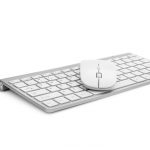 |
5. Input Devices. While the other components are all located inside the computer, input systems are external hardware devices used to interact with or control the computer. Popular input devices include the keyboard, mouse, touchpad, scanner, digital camera, microphone, joystick, trackball, touch screen, and webcam. All send data to the computer for processing. |
Hopefully, that super complex machine sitting on your desk seems a little less mysterious now. And you didn’t even need a catchy tune to help you learn!
Sources: Some information for this article was provided by online articles from turbofuture.com, medium.com, techtarget.com, unimelb.edu.au, and madaboutcomputer.com.